
Shopify app for quote-only products
Quote-only products, locked at checkout.
QuoteLock turns the products you choose into quote requests. Prices read “Price on request”, Add to Cart becomes Add to Quote, and checkout stays shut until you approve a price.
- Runs on Shopify Functions
- Matches your theme
- Draft orders never blocked
Built on Shopify checkout. Locks every way to pay.
- ShopPay
Works on every Shopify plan:BasicGrowAdvancedPlus
How it works
From “Price on request” to paid, in four steps.
Shoppers ask, you price, and only the right customer can check out.
- 01You
Lock the products
Pick quote-only products by tag, collection or search. Their price becomes “Price on request” and Add to Cart becomes Add to Quote.
- 02Shopper
Requests a quote
They build a quote in a side panel and send it with their details. No account needed.
- 03You
Set the price and approve
Adjust quantities and prices on the request in QuoteLock, then approve and send.
- 04Customer
Pays at a private checkout
QuoteLock creates a draft order and emails a checkout link that only that customer can use.
Inside the app
Built into your Shopify admin.
Clean, native screens for locking products, styling the button and closing quotes.
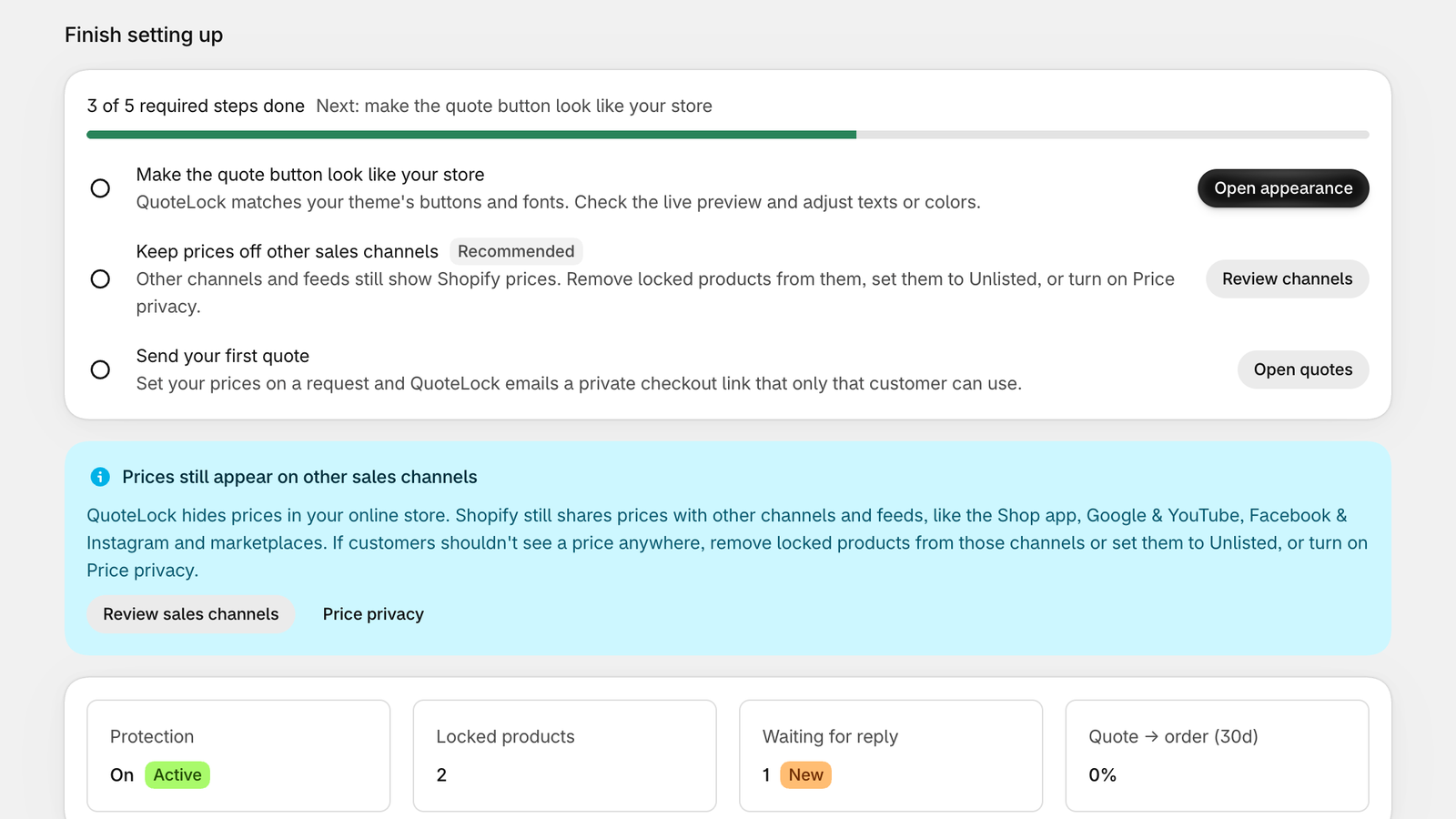
Everything at a glance
Protection status, new quote requests and a guided setup checklist that ticks itself off as you go.
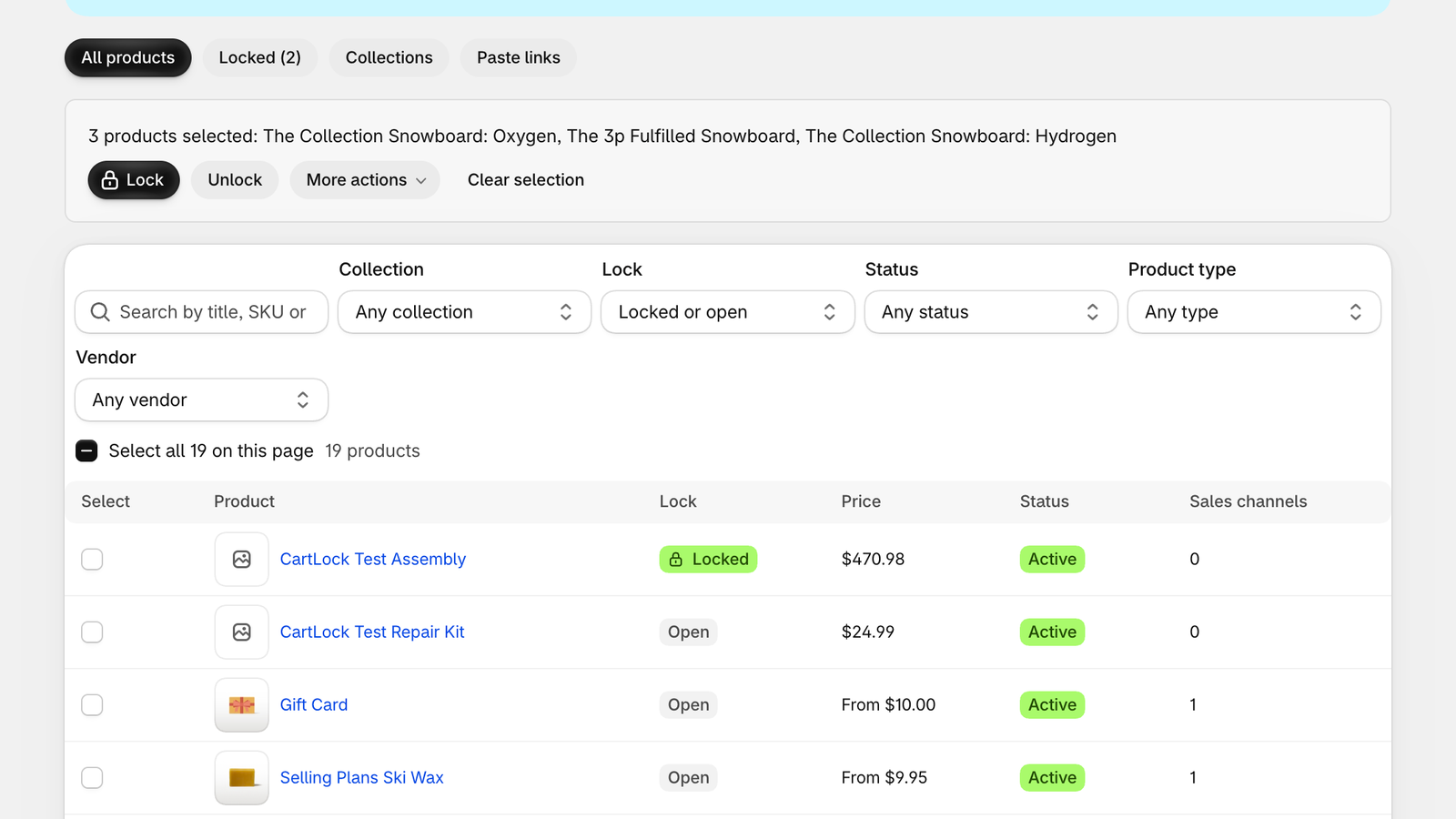
Lock products in bulk
Search and filter by collection, type, vendor, status or lock state. Select one, a page or every match, lock whole collections, or paste links. Every bulk change is confirmed first.
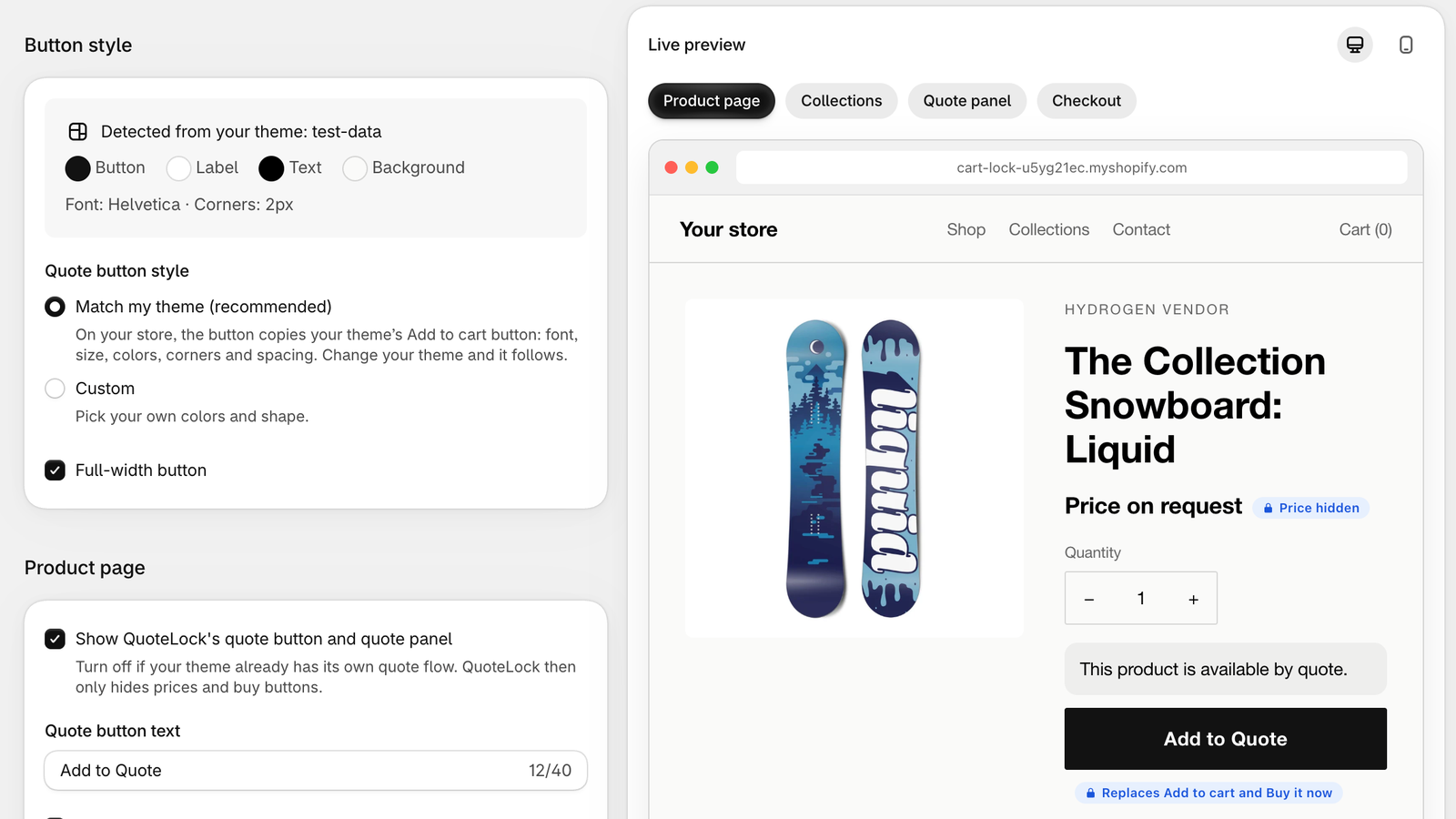
Matches your theme
The Add to Quote button copies your theme's font, colors and corners. Adjust text and styling with a live preview.
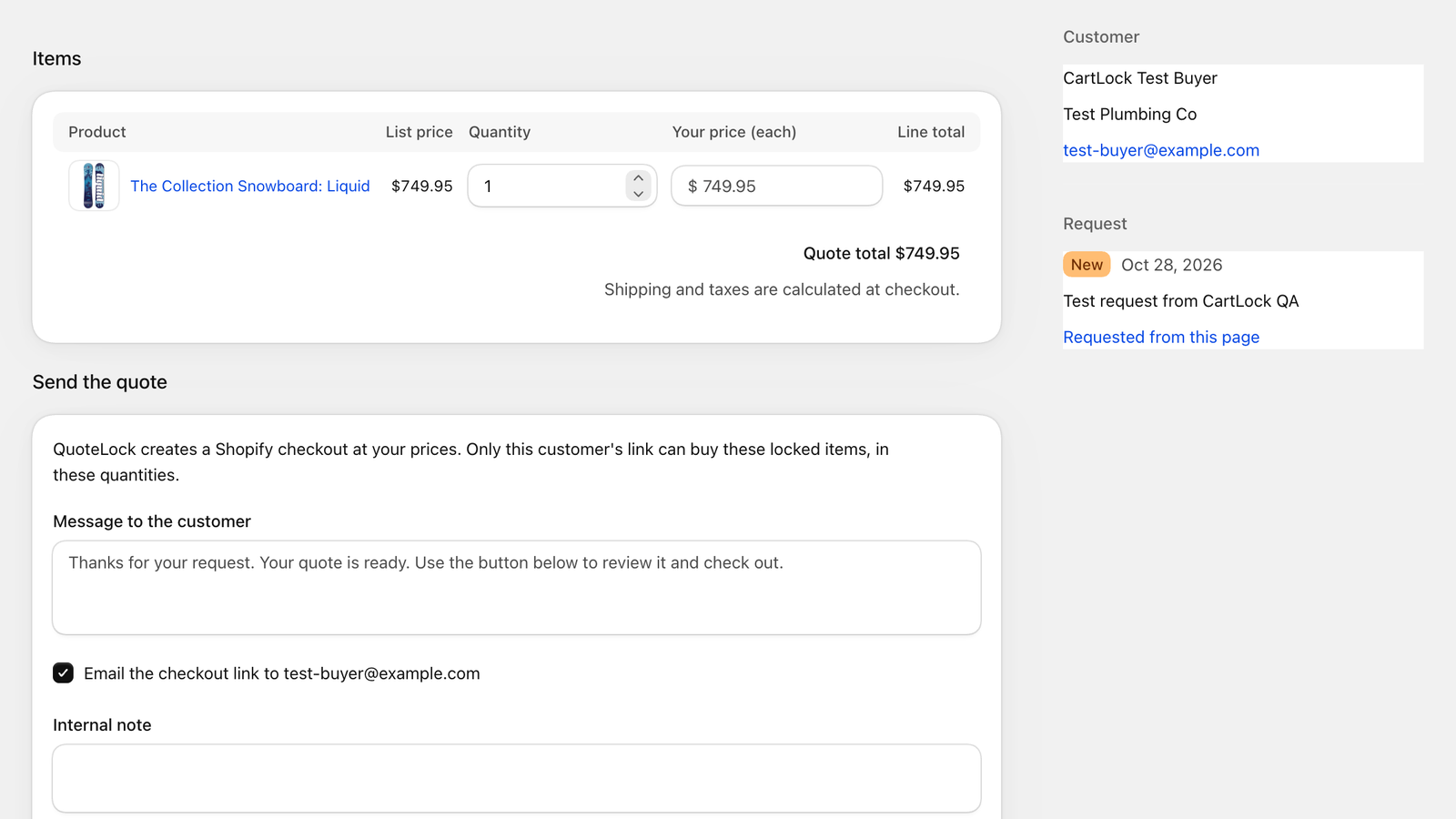
Price it, approve it
Edit quantities and prices on each request, then approve. QuoteLock creates the draft order and emails a checkout link only that customer can use.
Tiered volume pricing
Reward bigger orders on products people can buy right away, with a tier table on the product page and automatic discounts at checkout.
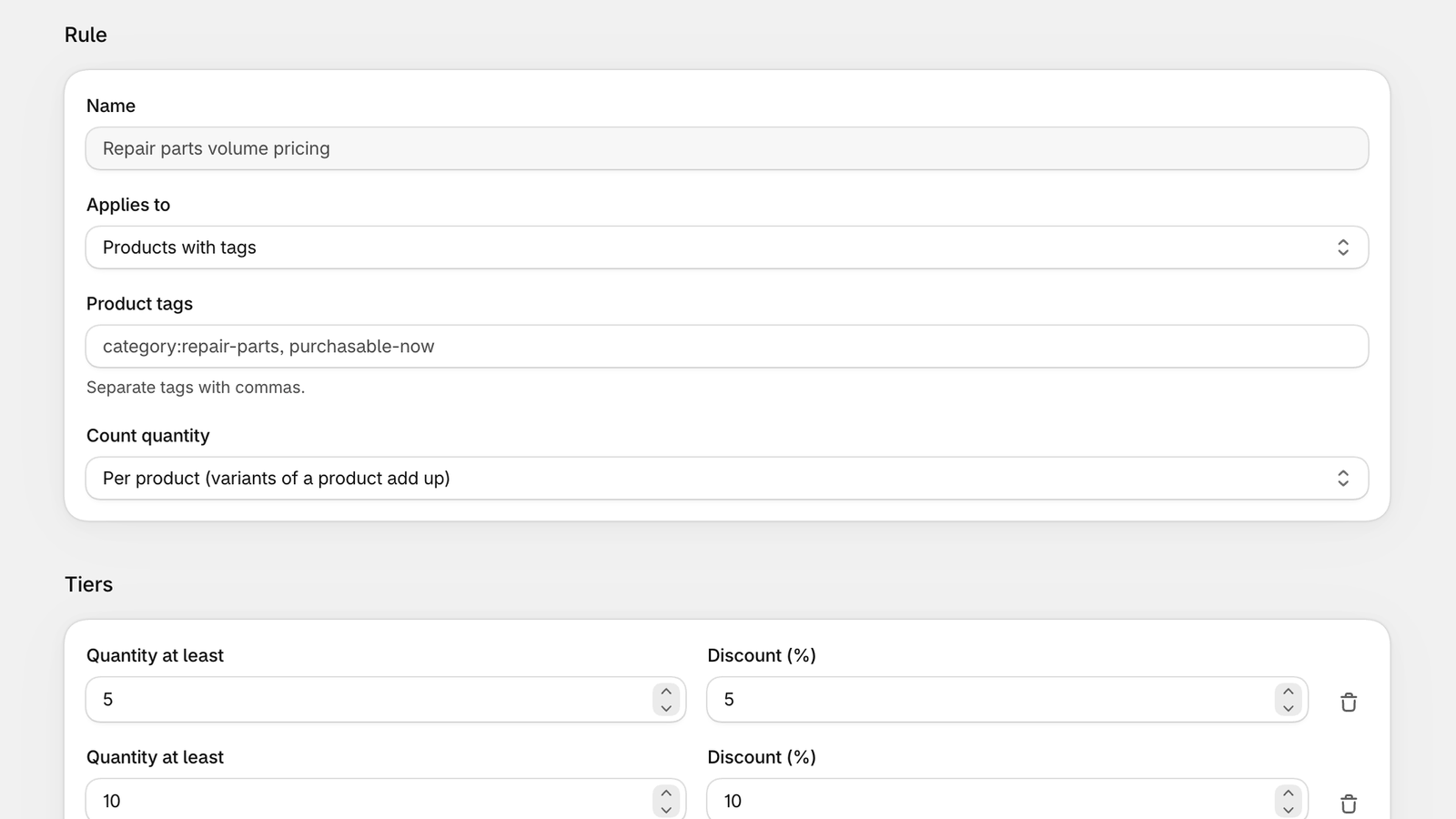
Set up in minutes
A step-by-step guide with use cases, from quote-only equipment to trade accounts and freight.
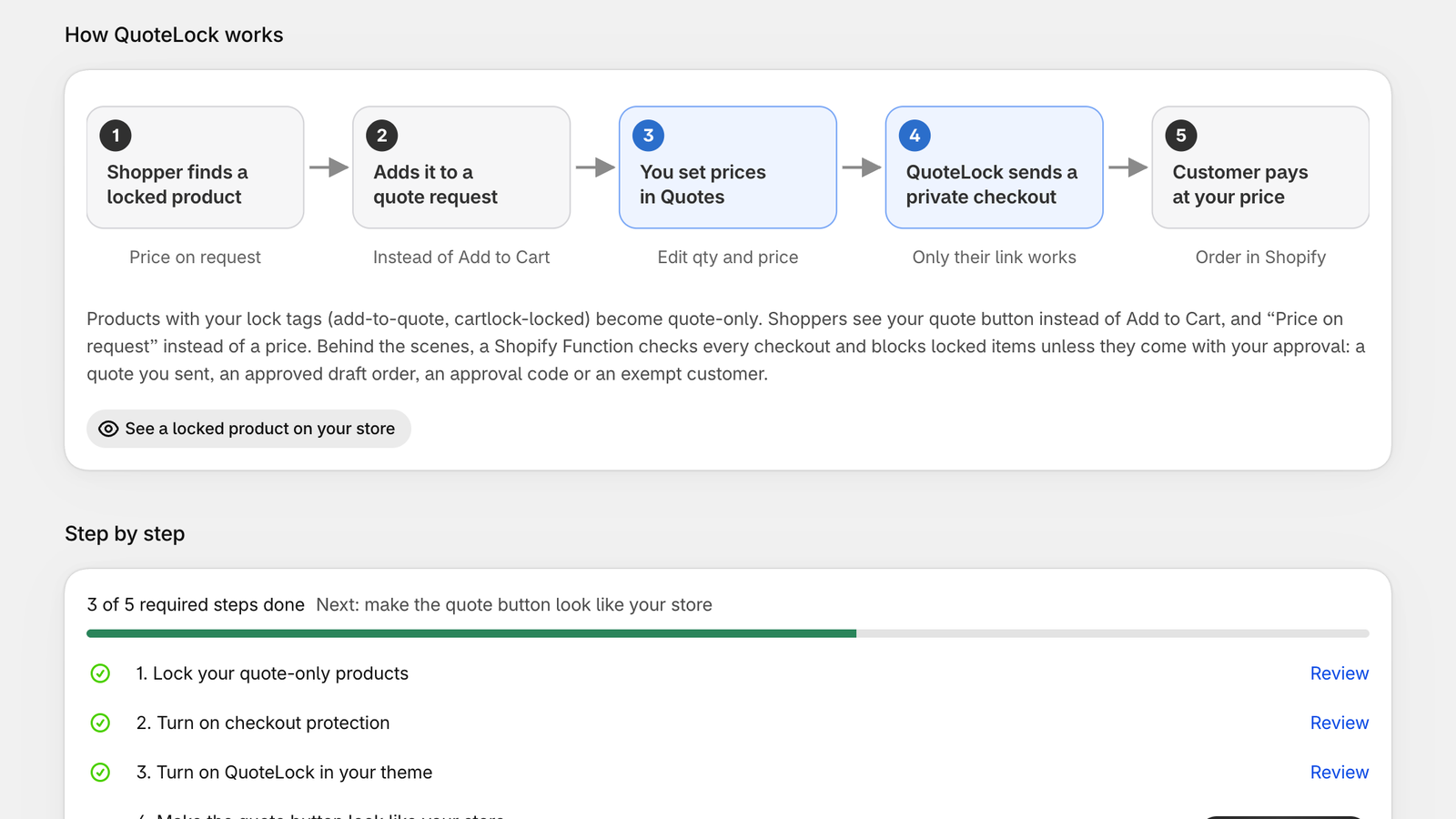
Why it works
Better for you. Clearer for your buyers.
For merchants
- No more orders at a price you can't honor. Locked items can't be bought by accident or on purpose.
- Every request arrives with contact details, products and quantities, ready to price.
- Approve once and QuoteLock does the rest: draft order, checkout link and email.
- Keep your theme. The quote button looks like it was always there.
- Staff draft orders, estimates and trade accounts keep working.
For buyers
- A clear “Price on request” instead of a misleading price or a dead end.
- Build one quote across several products from a simple side panel.
- No account or sign-up needed to ask for pricing.
- A personal checkout link at the agreed price, with the store's usual checkout.
- Trade buyers with approval check out as normal.
Features
Everything you need to sell by quote.
Locked at checkout
A Shopify Function checks every checkout on Shopify's servers. It can't be bypassed in the browser.
Add to Quote, in your style
The quote button auto-matches your theme's font, colors and corners. Fine-tune it on the Appearance page with a live preview.
Quotes inbox
Every request in one place. Edit quantity and price per line, add a note, approve and send.
Private checkout links
Approved quotes become draft orders with a checkout link that works only for that customer.
Bulk product locking
Filter by collection, type, vendor, status and lock state. Lock one, a page, every match or whole collections. Paste links to lock fast.
Quantity breaks
Tiered volume discounts with a tier table on the product page, applied automatically at checkout.
Approvals
Let trade accounts skip the lock with customer tags, or hand out approval codes for specific carts.
Draft orders always work
Draft orders and estimates from your staff or your own systems are never blocked.
Sales-channel controls
Remove locked products from other sales channels or set them to Unlisted, in bulk, so prices stay out of feeds.
Price privacy
Optional: keep real prices of quote-only products out of Shopify entirely. Quotes always use the real price.
Your checkout message
Write the message shoppers see when a locked item stops checkout, naming the product.
Guided setup
A live checklist and a guide with real use cases get you from install to first quote quickly.
Checkout protection
Blocks every path to checkout.
Hiding a button isn't enough. Shoppers can paste a cart link or tap an express payment button. QuoteLock checks the cart inside Shopify's checkout itself, so locked items only get through with your approval.
- Theme Add to CartReplaced with Add to QuoteBlocked
- Cart links/cart/40213:1 and permalinksBlocked
- Shop PayAccelerated checkoutBlocked
- Apple PayAccelerated checkoutBlocked
- Google PayAccelerated checkoutBlocked
- PayPalExpress checkoutBlocked
- Approved quote linkOnly for the customer it was sent toAllowed
- Staff draft ordersInvoices and estimatesAllowed
Use cases
Made for products that need a conversation first.
- 01
Custom and made-to-order
Furniture, signage, engraving and anything built to spec. Collect the details, then price it.
- 02
Equipment and B2B parts
Machinery, fixtures and parts where the price depends on the job, the quantity or the customer.
- 03
Trade and wholesale
Approved buyers check out normally; everyone else requests a quote.
- 04
Freight and oversized
Products that need a delivery quote before anyone pays. Add shipping to the draft before sending.
- 05
Estimates from your systems
Sales teams, ERPs or estimate apps that create draft orders keep working, untouched.
- 06
Volume pricing
Quantity breaks reward bigger orders on products customers can buy right away.
Pricing
One plan. Everything unlimited.
No tiers, no per-quote fees, no caps on products or quotes. Every feature on every Shopify plan, billed through your Shopify invoice.
QuoteLock3-day free trial
$29.99/ month
Billed by Shopify. Cancel anytime by uninstalling.
- Unlimited locked products
- Unlimited quote requests
- Checkout protection on every path
- Theme-matched Add to Quote
- Private checkout links
- Quantity breaks
- Bulk lock and sales channels
- Price privacy
Works on Basic, Grow, Advanced and Plus.
Which Shopify plans does QuoteLock work on?
Do I need Shopify Plus or checkout extensibility?
What about the Starter plan?
Does it work with my theme?
How much does it cost?
Can shoppers get around the lock?
Are prices hidden everywhere?
What does Price privacy do?
Will my staff's draft orders and estimates be blocked?
How does a customer pay for an approved quote?
Can trade customers skip quotes?
Will the button match my theme?
What data does QuoteLock keep?

Stop selling quote-only products at the wrong price.
Install QuoteLock, lock your first product and send your first quote today.